(15 points)
In this assignment, you will practice doing the following:
We all know our date of birth. But do we all remember the day of the week we were born? After this assignment, you will have a software tool to answer that question (and any other asking for the day of the week of any date). The goal is to write a program that displays the calendar for a month given the month and the year.
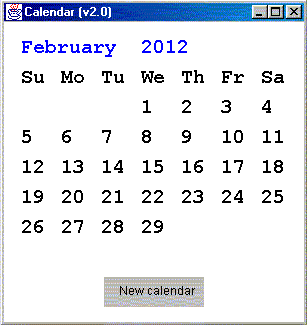
Below is a snapshot of a possible display of the calendar in the graphics window.
The window has a button to allow the user to enter another month and year for a new calendar.
The application should work with any positive year (within the range of an integer).
Some explanations
In this program, you will use two classes. Below is an explanation of some of the features of the classes. Some code is already written in the sample files. Read through it as well. You will see that this assignment gives you a lot of freedom for the implementation.
class Calendar
A Calendar is the representation of a calendar for any month of any positive year.
The class features 2 public methods:
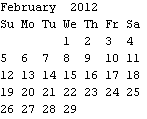
In the Calendar class, you will implement the algorithm to compute the calendar. To help you figure out the algorithm, read through these notes.
CalendarDisplay class
A CalendarDisplay features a graphics window that displays the calendar for a given month and year.
The window has a button to let the user input a new year and month. A click on the button brings up a dialog box to input the month followed by another dialog box to input the year. If the user inputs an invalid value for the month (not between 1 and 12) or for the year (non positive integer), display an error message and ask for the input again. To draw the button, use the graphics classes in the uwcse.graphics package (e.g. Rectangle and TextShape).
How do we make a CalendarDisplay able to respond to mouse events (clicks on the button)? The answer is beyond the scope of our class (but it will be covered in 143). The code to let our CalendarDisplay be receptive to mouse events is already written (class declaration and in the constructor). The only thing that you need to know is that the handling of the mouse events is done in the method mousePressed. This is where you write the code to ask for the input of the month and year if the click is on the button.
The details of the computation of the calendar are handled by a Calendar object inside of the CalendarDisplay (variable named calendar). Once the variable calendar is initialized, use it to get the calendar as a String (call the toString method of the Calendar class). Unfortunately, to display the calendar in the graphics window, putting the String directly inside a TextShape doesn't do it (e.g. new lines are not understood by a TextShape). What you can do is parse the String (use a StringTokenizer and/or the substring method of the String class) to extract each element of the String. Put each element in a TextShape that you display at the right location in the window.
For instance to extract each line in the String given by Calendar.toString() use:
 StringTokenizer st = new StringTokenizer(calendar.toString(),"\n");
while(st.hasMoreTokens()) { String line = st.nextToken(); // process the line
(e.g. display the line or parts of it in a TextShape) }
Another point:
To display a new calendar, the easiest approach is to erase the contents of the window by using window.erase(). Then redisplay everything in the window (the button and the new calendar).
What you need to do
Starting from the sample files, create a CalendarDisplay that meets the requirements listed above (display, button, event handling,...). You may change some of the code of the sample files. However, you must stay within the spirit of the assignment. You have to use the two classes, CalendarDisplay, and Calendar. These two classes should work together as indicated in the explanations above. The interface should be along the lines of the comments written in the sample files (Your contract is the documentation generated by the javadoc comments in the sample files). You can't use any other class than the classes available via the import statements (if you are in doubt, ask me). There are classes in Java that can compute a calendar (e.g. java.util.GregorianCalendar). Of course, you can't use them in this program.
As usual programming style counts. The main programming constructs of this assignment should be if/else if and loops. There is an important point to pay attention to: you shouldn't have to write a long sequence of if/else if (or cases if using a switch) to create all possible calendars. Instead, just use one or more loops to create the calendar. Also, though not absolutely necessary, you may use arrays (e.g. to create the display, you might want to use an array of TextShapes. Each element of the array would correspond to a line of the calendar). If you do use arrays, make sure that you use them with the proper style. For example, the elements of the TextShape array should be set in a loop.If txtShape is the name of the array, don't write code such as txtShape[0] = ..., txtShape[1] = .... It is better style to write a loop: for(int i = 0; i < txtShape.length; i ++) { txtShape[i] = ...}
Sample code
Calendar.java, CalendarDisplay.java
Your program has to be your own.